
Watch your steps go up live.
Pick a number, say 5,000 steps. Put your show on and start walking. Walkey counts every step right in front of you, on your iPhone and your Apple Watch.
[TEXT: two short sentences in Walkey's voice on what Walkey is not, so it doesn't read as just another step app]
How it works
[TEXT: one-line title for the three steps]
- 1
Pick a goal
[TEXT: one sentence for picking a daily step goal]
- 2
Walk
Your steps go up as you walk, with the steps and time to go right there. On a treadmill at home, or outside on your usual route.
- 3
Watch your streak grow
[TEXT: one sentence for the streak growing each day you reach your goal]
Daily goal
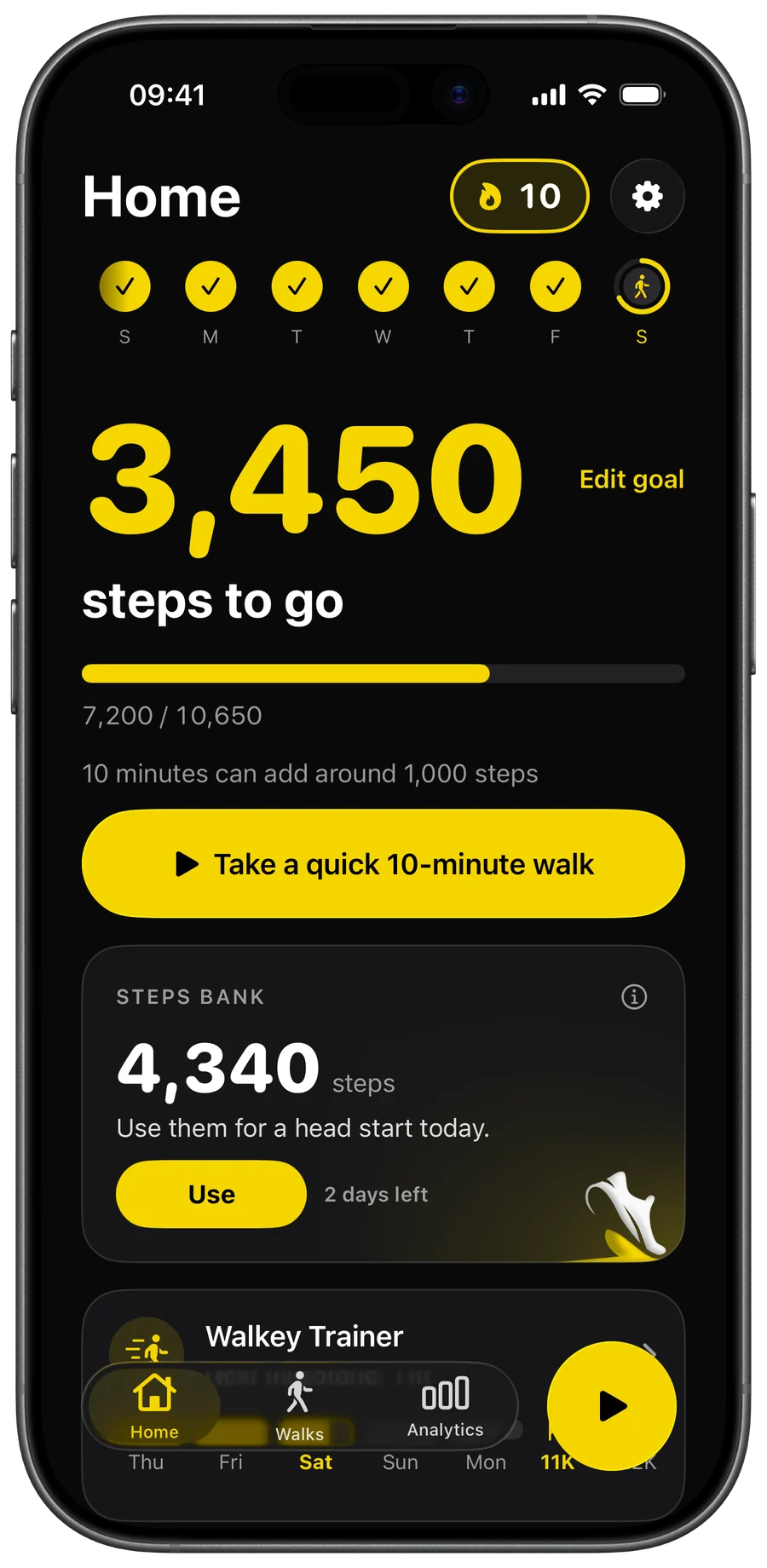
One number. Steps to go.
Open Walkey and see exactly how far you are from today's goal. Reach it, and your streak grows.
7,200 / 10,650
10 day streak
- S
- M
- T
- W
- T
- F
- S
Steps bank · Pro
[TEXT: title for the steps bank]
A bad day doesn't have to end your streak. Extra steps from a good day can save it.
[TEXT: the rule in plain words. Steps above your daily goal go into the bank. A missed day is frozen, and Save Streak spends banked steps on it. Banked steps can also give a head start on today's goal. The bank resets every Sunday at 23:59:59; a missed day not saved by then is lost and the streak starts again from zero. Pro only.]
Steps bank
4,340 steps
Use them for a head start today.
Apple Watch
[TEXT: title for walking with Apple Watch]
[TEXT: one sentence on following a walk on Apple Watch]
[BLOCAT: the real Apple Watch picture. The Walkey Watch simulator can't be started from here; it needs the Orchestrator or a screenshot from Paul's Watch.]
Free and Pro
Free is good. Pro goes further.
Free
Free to download
- Your daily steps, goal and streak stay free.
- Free includes 3 live walks in total.
Walkey Pro
$14.99 a year, 14 days free
$1.99 a month, 7 days free
- Unlimited live walks: walk as often as you like.
- Steps bank: extra steps from a good day can save your streak.
- Walkey Trainer: a goal that goes up a little each time you reach it
- Analytics: your trends, your month at goal and your personal bests
- Your color and more widgets: make Walkey yours
Apple handles payment, cancel anytime.
Questions
[TEXT: title for the questions]
Is Walkey free?
Free to download. Your daily steps, goal and streak stay free. Free includes 3 live walks in total. Walkey Pro adds unlimited live walks and extra features, listed in the app.
Do I need an account?
No. Walkey has no account, and we never ask for your name.
What does Walkey do with my Health data?
Your step counts, distance, heart rate and other Health values are never sent to us. Our Privacy Policy explains exactly what is and isn't shared.
Do I need an Apple Watch?
No. You can walk with just your iPhone. Walking with your Apple Watch also shows your heart rate.
How do I cancel?
In Walkey, go to Settings, then Walkey Pro, then Manage subscription. You can also do it in your iPhone's Settings app: tap your name, then Subscriptions. Canceling stops the next renewal, and you keep Pro until the paid period ends.
How do I restore my purchase?
Open the Walkey Pro page in the app and tap Restore. Make sure you're signed in with the Apple Account you bought it with.
Your first 3 live walks are free.
Coming soon to the App StoreFree to download. Your daily steps, goal and streak stay free.